A label proof checklist for your first candy packaging order
Check copy, size, readability, versions, and scan destinations before approving a print run.
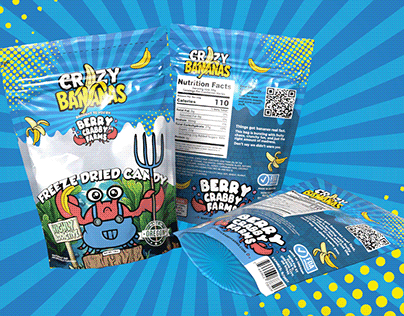
Review the copy before the colors
Split proofing into passes. In the first pass, read every word against your approved source copy. Check the product name, flavor, net quantity, business details, and any required label information. Do not use a visual impression of the layout as a substitute for a word-by-word check.
For U.S. food businesses, the FDA says manufacturers are responsible for compliant labeling. The details depend on the product and applicable rules. This checklist organizes your proofing work; it does not determine whether a specific ingredient statement, nutrition panel, or claim is legally sufficient.
Print it at actual size
A proof enlarged on a monitor can hide small type and awkward spacing. Print the artwork at its intended dimensions, cut it out, and place it on the actual packaging. Check that the label fits a usable area and that important information does not wrap into a seam or become difficult to read.
Look at the product in normal room lighting and photograph it with a phone. Ask someone who did not design it to identify the brand, product, and quantity. Record what they could not find rather than immediately explaining the design to them.
Treat each product as its own proof
A correct master design does not guarantee correct variants. Compare every flavor name with its matching ingredients, quantity, barcode if used, and product photo. Use a simple matrix with one row per version and one column per item to verify.
Pay special attention when a template was duplicated. Old product names and contact details often survive in a small text box or on the back. Read the whole proof for each variant rather than checking only the part that changed.
Test links and code destinations
Scan every QR code from the actual-size proof using more than one phone if possible. Confirm the destination is your intended public page and that it works without a login. Read the destination on a small screen and verify that the customer can complete the intended action.
A successful scan on a bright monitor is not the same as a successful scan from a printed label. Ask your printer about their proof process and test the final printed result. Keep essential information readable without requiring a QR scan.
Make final approval unambiguous
Ask the printer to confirm bleed, safe areas, color expectations, material, finish, and file requirements for the exact process being used. Do not guess a universal bleed dimension or assume that every finish reproduces color identically.
Use this approval log: filename and revision; product variant; dimensions; copy checked by; actual-size check completed; QR destination checked; supplier questions resolved; approval date. Save it with the final proof. If anything changes after approval, create a new revision and repeat the affected checks.
Sources & further reading
Examples are illustrative unless stated otherwise. These guides use AI-assisted drafting and do not represent product tests or guaranteed business results. Read our editorial approach.